
Making a Swirly Border Design- Illustrator Tutorials

Making a Swirly Border Design- Illustrator Tutorials - Maa Illustrations

Get tips and tricks on how to use swirly border designs in different types of illustrations and designs. This guide will help you master the art of making a swirly border design and take your illustrations to the next level.

Find out how to make a Swirly Border Design

 Step #1: Go to File>New. Choose Basic RGB from the New Document Profile and click OK. Click on the rectangle tool and pick the Rounded Rectangle tool and click once on the artboard. A dialog box will appear. Now, enter a Width of 725 pt, a Height of 285 pt, and set the Corner Radius to 15 pt. Click OK.


Making a Swirly Border Design


Step #2:  Open the Swatches panel (Window>Swatches) and pick the brown swatch labelled R=117 G=76 B=36. In the Control panel, set the Stroke colour to none.


Step #3:  Draw small rounded rectangle


Making a Swirly Border Design


Using the Rounded Rectangle tool, click on the artboard once more. Set the Width to 650 pt, the Height to 225 pt, and keep the Corner Radius at 15. Click OK. Now you have a similar but smaller rectangle.


Step #4:  Apply fill and align shapes

From the Swatches panel, pick the tan swatch labelled R=199 G=178 B=153. Set the Stroke colour of this shape to none. Switch to the Selection tool (V) and choose both the shapes. Align the shapes using Horizontal Align Centre and then Vertical Align Centre.


Making a Swirly Border Design


Step #5:  Copy Smaller Rectangle; Paste in Back

To deselect the shapes, press Shift-Command-A. Then use the Selection tool to select the front smaller rectangle. Go to Edit>Copy to copy this shape to the Clipboard. Now Edit>Paste in Back to place the duplicate one level behind the smaller shape but in front of the larger shape.


Step #6:  Lock the shapes

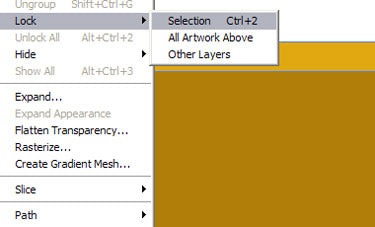
Select the new shape and hold the Shift key and then drag a selection from outside the shapes into all of the shapes. This way you can select the two other shapes and deselect the one inner shape. Then go to Object > Lock > Selection to lock these shapes in place.


Step #7:  Choose the inner shape 
 

Making a Swirly Border Design


Now drag over the shapes to select the inner shape which is in between the locked shapes. To make sure that the other shapes are locked, drag the object to the side a bit. Use Command-Z (PC: Ctrl-Z) to undo the move.


Making a Swirly Border Design


Step #8: Pick the Twirl tool from the Wrap tool option. Double-click on the Twirl Tool Options to open the dialog box. Change the Intensity to 40% and the brush size; enter a starting value, to 125 pt for both the Width and Height. Click OK.


Making a Swirly Border Design


Step #9: Start from the upper-left corner. First of all, position the cursor so it’s about two-thirds over the shape. Then, click and drag the Twirl tool up and to the left. The twirl will start the moment you click and will change as you drag. It needs some practice so try it a few times.


Making a Swirly Border Design


Step #10:  Make Random Twirls around the Shape

The direction of the twirl here is counter-clockwise by default. To reverse the direction, click to start the twirl and then hold the Option key (PC: Alt key). Continue to randomly twirl different areas around the shape, varying the directions. Press and hold the Option key (PC: Alt key) to change the size of the brush and then click and drag. Add the Shift key to maintain the brush’s proportions.


 Making a Swirly Border Design


Step #11:  Drop the shadow

Choose the object and open the Transparency panel (Window>Transparency). Change the blend mode from Normal to Overlay. As an optional step, go to Effect > Illustrator Effects > Stylize > Drop Shadow. Depending on the shape and size of your swirls, the settings of the shadow will vary.


Step #12:  Add Texture to Front Shape

Navigate to Object > Unlock All. Select the front shape. And then go to Effect menu, under Photoshop Effects, and select Texture>Texturizer. Choose Sandstone for the Texture drop-down menu. Set the Scaling to 200%, Relief to 5, Light position to the Top Left, and click OK. Add the text.


Making a Swirly Border Design


Making a Swirly Border Design


Step #13:  Final Image


Making a Swirly Border Design


Don't miss out on this limited time offer!

Amazing illustration sale

Hire an illustrator - Maa Illustrations
Hire a Professional Illustrator for Unique, Cus... from £59.00 £120.00
Hire a Professional Illustrator for Stunning, Custom ArtworkWhen you hire a professional illustrator, you're not just getting a service; you're investing in exceptional visual storytelling that brings your ideas to life. Our talented team prides itself on delivering unique, high-quality illustrations tailored exactly to your needs. Whether you’re working on a book, designing promotional materials, or require technical illustrations, we have a versatile range of styles to choose from, ensuring your project shines.Imagine captivating your audience with artwork that reflects your vision perfectly. With our service, you can communicate your message more effectively, engage your viewers, and elevate your brand's identity. 100% unique artwork tailored to your project requirements Wide variety of illustration styles, including Book and Technical Complete ownership of all copyrights for the final designs Money-back guarantee if you’re not completely satisfied If your project requires more than 40 hours of illustration work, don’t hesitate to contact us for a special rate. Make your vision come alive today by hiring a professional illustrator who understands your artistic needs and is dedicated to making your project a success!
Sample Book Illustration Services - Maa Illustrations
Transform Your Story with Our Expert Book Illus... £25.00 £90.00
Transform Your Book with Our Expert Book Illustration Services Are you ready to embark on the exciting journey of self-publishing your own book? With our expert book illustration services, you can breathe life into your story, captivating young readers and sparking their imaginations. Imagine your characters leaping off the page in vibrant colors and stunning detail, making your narrative truly unforgettable. Our Sample Illustration service, now offered at just £30 (originally £90), is the perfect way to kickstart your project. Experience our unparalleled quality and professionalism firsthand. If our illustrations resonate with you, consider diving deeper into our full children's book publishing package for a comprehensive solution tailored specifically for aspiring authors like you. Professional, high-quality illustrations that capture your story's essence. Budget-friendly Sample Illustration service to test our skills. A dedicated team passionate about bringing your vision to life. Flexible packages to suit various publishing needs. This limited-time offer is your gateway to creating an engaging visual experience for your readers. Let us transform your story with our exceptional book illustration services—your words deserve to shine!
Custom Tattoo Design Service - Create Your Unique Ink Masterpiece - Maa Illustrations
Custom Tattoo Design Service - Create Your Uniq... from £59.00 £120.00
Enhance Your Self-Expression with Our Custom Tattoo Design Service Looking for a Custom Tattoo Design Service that truly embodies your unique story? Our talented artists are here to help you transform your ideas into stunning, personalized tattoo artwork. Whether you have a rough sketch or just a vision in mind, we’ll work closely with you to ensure that every detail captures your personality and style. Imagine wearing a piece of art that reflects your journey, your passions, and your individuality. With our bespoke designs, you’re not just getting inked; you're making a statement. Our team understands that each tattoo is a personal expression, and we’re committed to making sure yours is nothing less than perfect. Collaborative design process tailored to your vision Experienced artists who understand the art of tattooing High-quality, custom designs that speak to your personality Flexible options and styles to suit any taste Fast turnaround time to get you inked sooner Don’t settle for generic tattoos. Take the leap into self-expression and create your custom design today. Let us help you wear your heart on your skin!
Custom icon illustration service - Maa Illustrations
Custom icon illustration service from £19.00 £40.00
Transform Your Brand with Our Custom Icon Illustration Service Enhance your digital presence with our custom icon illustration service. We craft 100% unique, tailor-made icons that not only beautify your interface but also elevate user experience across all your platforms. Whether you're developing a website, mobile app, or software, our icons communicate your message effectively, making your brand stand out! Imagine having a set of icons that perfectly align with your brand's identity and vision. Our expert designers collaborate closely with you to ensure every icon reflects your style and resonates with your audience. From logos to e-Learning applications, our illustrations are versatile enough for any environment. Key Highlights: 100% unique, custom-designed icons Fast turnaround: Get your first proof within 2 working days Unlimited revisions to ensure your complete satisfaction Starting prices from just £5 Special pricing for orders over 10 icons If you need more than 10 icon designs, please contact us for a special price. We are committed to providing you with exceptional value and service. Don't settle for generic icons—let us help you create something remarkable!
Mastercard PayPal Shop Pay SOFORT Visa